Disclosure: I build Murmur, one of the tools in this piece. I've tried to give the others their real strengths and to state Murmur's limits.
One prompt is not a plan
Most of my projects with a coding agent start the same way. I have an idea, and I want to type it into Claude Code and watch it build. For a one-file script, that works. For anything bigger, one prompt leaves too much open. Who is the user? What is out of scope? What does "done" mean for the onboarding flow? The agent fills each gap with a guess, and I spend the afternoon steering it back.
Claude Code's own best practices point the same way. When you don't know exactly what you want yet, they suggest asking Claude to interview you and write the answers to a SPEC.md, then building from it in a fresh session, so the build starts with "a written definition of done".
A PRD is that plan, written down. The agent can re-read it on each turn instead of relying on something you said three messages ago.
What a PRD needs when the reader is an agent
A PRD written for a team leans on shared context: the meeting everyone was in, the competitor everyone knows. An agent has none of that. It reads what is on the page and what is in the repo, nothing else. So the sections that matter shift a little.
| Section | What to write | Why the agent needs it |
|---|---|---|
| One-liner and target user | What it is, for whom, and the moment they reach for it | Keeps names, copy and defaults consistent |
| Features, ranked | Must, Should, Could, Won't, each with a one-line reason | Tells it what to build first and what to leave alone |
| Non-goals | What you are deliberately not doing | Stops it adding things you didn't ask for |
| Acceptance criteria | A short checklist or given/when/then per story | A definition of done it can test against |
| Tech constraints | Stack, data model, services you have already chosen | Stops it picking a new framework halfway through |
| How to verify | Commands to run, tests, what a screen should show | Lets it check its own work |
| Open questions | Decisions not made yet, and who makes them | Tells it where to stop and ask |
Two of these deserve more words.
Non-goals. This is the section I used to skip and now write first. Agents are eager. If the PRD says nothing about team accounts, the agent may scaffold an organizations table you then have to rip out. One line, "No team accounts in the first version", is usually enough to stop it.
How to verify. Claude Code's guide says to give Claude something it can run that comes back pass or fail: a test file, a build's exit code, a linter, or a browser screenshot next to the mockup. Put those commands in the PRD next to the stories they prove. "Done" stops being a feeling and becomes a check that passes. For the stories themselves, the user story template has acceptance criteria in a form an agent can test against.
Where to put it so the agent reads it
A good PRD in a Google Doc does nothing for an agent that can't see it. Put it in the repo as Markdown, commit it, and point the agent at it.
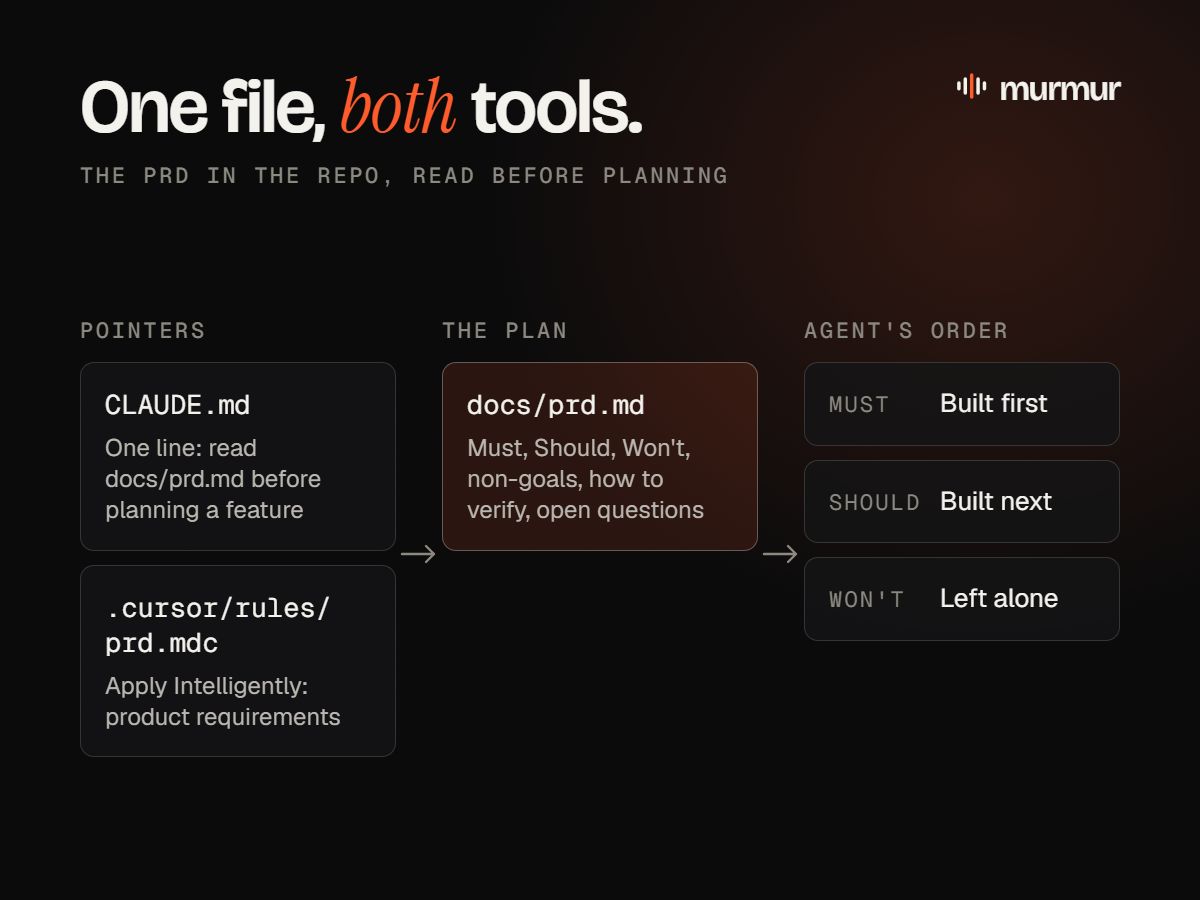
Claude Code loads CLAUDE.md into every session, and its docs advise keeping that file short: the commands that check work, the places where the code misleads, and decisions that aren't in the repo. A PRD is exactly that kind of decision, but it is too long to paste in. Keep it in docs/prd.md and add one line to CLAUDE.md telling Claude to read it before planning a feature. Then switch to plan mode (press Shift+Tab until the status bar shows plan mode, or start a prompt with /plan) and ask for a plan against the PRD before any code is written. Per the permission modes page, Ctrl+G opens the proposed plan in your editor, so you can change it before Claude starts. When the work is done, ask for a review of the diff against the PRD: the best-practices page suggests exactly that with a spec file.
Cursor loads project rules from .cursor/rules as .mdc files. Per its docs, a plain .md file in that folder is ignored; plain Markdown instructions go in an AGENTS.md file in the project root instead. Cursor suggests keeping each rule under 500 lines and referencing files instead of copying their contents, so the same pattern works there: a short rule set to "Apply Intelligently", described as "product requirements, read before building a feature", that points to docs/prd.md. Don't turn the whole PRD into a rule that loads with each request.
In both tools the PRD is now a file like any other. When you change it, the change shows up in the diff, and the agent works from the new version. If you want to check how the Markdown reads before you commit it, the free Markdown viewer renders it in your browser.
A template you can paste
This is the skeleton I use. Fill it in, save it as docs/prd.md, and delete any section that doesn't apply.
# <Product name> — PRD

## One-liner
<What it is>, for <who>, unlike <the usual alternative>.

## Target user and trigger
One person. The moment they reach for this.

## Features
### Must
- <Feature>: <one-line reason>
  - Acceptance: <checklist or given/when/then>
### Should
### Could
### Won't (this version)

## Non-goals
- <Outcome you are not chasing>

## Tech constraints
Stack, hosting, data model, services already chosen. Anything the agent must not change.

## How to verify
- Run: <test command>
- Run: <build command>
- Check: <what the main screen should show>

## Open questions
- <Question> (owner: <name>; agent: stop and ask)
A fuller version, with an example filled in for each section, is on the PRD template page. If the build needs more engineering detail than the PRD holds, the technical design document template pairs with it.
Four ways to get the PRD written (and one more)
| Approach | Good at | Watch out for |
|---|---|---|
| Write it yourself from a template | Full control, no cost, and you understand every line | Slow for a new idea; research and non-goals are easy to skip |
| Have Claude interview you | Claude Code's docs describe Claude asking you questions until the answers add up to a SPEC.md, then building from it in a fresh session | Only as good as your answers in the moment; no outside research unless you ask for it |
| Kiro specs | Each spec makes requirements.md, design.md and tasks.md, with requirements in EARS notation ("WHEN … THE SYSTEM SHALL …") | Specs live in Kiro's own IDE and CLI, so you build in Kiro rather than your current editor |
| GitHub Spec Kit | A CLI, specify, sets up your coding agent; process commands such as /speckit.specify then run inside it, and Claude is among its integrations | More process than a weekend project needs; you still bring the product thinking |
| Murmur | Does the groundwork from a spoken or typed idea, including competitor research | Paid after the first idea; limits listed below |
If you already know the product well, the first two are enough, and they cost nothing. Kiro's specs and Spec Kit are strong when you want the plan, the tasks and the code to stay tied together as you build. I compared the dedicated PRD generators, including ChatPRD and Murmur, in an earlier post.
Where Murmur fits, and where it doesn't
Coding agents build better from a plan than from a prompt. One prompt is too vague, so the agent guesses. Writing the plan by hand means research, a PRD, a design and a backlog before the first line of code, and that is the step most of my side projects skipped.
So I built Murmur to do that groundwork. You say or type the idea: a voice memo of up to 10 minutes, or text typed in the desktop app. What you get back is competitor research with source links, a PRD with features ranked must, should, could and won't, a tech design with data models and a schema, a brand kit with a logo direction, and a roadmap with a board of epics and stories with ids. You download it as Markdown, or as a zip whose foundation/ folder holds the files a coding agent reads first. Claude Code and other MCP clients can also start a run through Murmur's MCP server, from a typed idea of 20 to 600 characters. Jira and Confluence come too, if you choose them for the run. If you'd rather see the PRD step on its own, the idea to PRD page shows it.
That gets you an agent that starts from a plan. You still read the PRD and fix what's wrong with it, as you would with one you wrote yourself.
One real run: Pagewell, an uptime monitor and status page, typed as a 35-word note. The run took 9m 50s and produced 11 epics and 40 stories. The eleven public example runs on the examples page took 7m 31s to 11m 05s.
The limits, plainly:
- Typing an idea works in the desktop app, not on phones. Voice memos are recorded on phone or desktop. Through MCP, runs start from typed text only.
- I haven't tried the MCP server from Cursor.
- Jira and Confluence happen only in your own Atlassian site, and a run with them creates a new Jira project and a new Confluence space. It isn't built to work inside ones you already have.
- No export to Linear, Notion or GitHub, and no in-app co-editing.
- It's a foundation, not a finished app.
Your first idea is free. After that it's $7 per idea, or a monthly plan from $19.
A checklist before you hand it over
Whichever way you write the PRD, run through this before the agent sees it:
- Can you name the one user and the moment they reach for the product?
- Does every Must have acceptance criteria?
- Is there a Won't list, and a Non-goals list?
- Does it name the stack, so the agent doesn't choose one for you?
- Is there a command the agent can run to check its own work?
- Are open questions marked "stop and ask"?
- Is the file in the repo, with CLAUDE.md or a Cursor rule pointing to it?
If you only add two sections to what you have today, make them the non-goals and the verification step. Those are the two an agent can't guess.
Sources
- Cursor's docs say to keep rules under 500 lines: cursor.com/docs/rules
- Murmur takes a voice memo of up to 10 minutes, recorded on phone or desktop, or an idea typed in the desktop app (not on phones), or sent as text through the MCP server (20 to 600 characters): trymurmur.studio/llms.txt
- Pagewell: a 35-word typed idea, a 9m 50s run, 11 epics and 40 stories: trymurmur.studio/llms.txt
- The eleven public example runs took 7m 31s to 11m 05s: trymurmur.studio/llms.txt
- First idea free; $7 per idea after that; Starter is $19/month for 5 ideas: trymurmur.studio/llms.txt
Facts checked
next: I Compared 8 AI PRD Generators (Including Mine)
Read the next post →